How to make web applications support multiple browser windows
2021-10-03
Motivation
When we develop a single-page application, we usually define its behavior for a single browser window. Even if the same application is opened in multiple windows, most applications only synchronize through local storage or server-side data. The in-memory state of each window is usually not synchronized in real time, so each window runs as an isolated application instance.
This means that opening more browser windows creates more independent application instances. These instances may have inconsistent UI states and duplicate network requests or WebSocket connections. The result can be a worse user experience and unnecessary server resource usage.
So what does it mean for an application to support multiple browser windows?
- Application instance sharing: code sharing, local storage sharing, state sharing, and more
- Lower server resource usage
- Better user consistency experience
- Smoother web applications
However, it is not easy to keep large web applications running smoothly.
Web applications are still primarily built with JavaScript, and long-running JavaScript can block browser rendering. The good news is that mainstream browsers support different types of workers, especially Service Workers for PWAs. Modern browsers also provide Web Workers and Shared Workers. With IE deprecated, there is good support for these workers, although Shared Worker support still needs careful compatibility handling.
So what does it mean for Web applications to be “multi-threaded” with Worker?
The article “The State Of Web Workers In 2021“ covers several performance issues that workers can help address. With browser workers, we can move computationally expensive and slow-running JavaScript away from the rendering path and keep web applications more responsive.
It is time to rethink how web applications can support multiple browser windows while improving performance. These architectural requirements call for new framework support. We call this model Shared Web Apps.
Shared Web Apps
Even though we want users to open as few application windows as possible, the fact remains that many users will open the same application in multiple browser windows.
Shared Web Apps support running a web application across multiple browser windows.
The model has one logical server thread that coordinates code sharing, local storage sharing, state sharing, and other shared resources. No matter how many browser windows are opened, there is only one server app instance shared by multiple client apps. DOM operations are expensive, so in Shared Web Apps the client app is responsible only for rendering and state synchronization. Almost all business logic runs in the server app.
- The client app only renders UI, making better use of the device’s multiple cores and improving responsiveness
- Solve the problems caused by multiple browser windows
- Better separation of concerns
reactant-share - A framework for building Shared Web Apps
To build Shared Web Apps, reactant-share was created. It is based on the reactant framework and the react library, and supports the following features:
- Dependency injection
- Immutable state management
- View module
- Redux plug-in module
- Test bed for unit testing and integration testing
- Routing module
- Persistence module
- Module dynamics
- Shared web apps with multiple browser-window support
- Shared tab
- SharedWorker
- ServiceWorker
- Browser extension
- Detached window
- iframe
reactant-share is designed to make Shared Web Apps easy to build. It reduces the complexity of supporting multi-window application architecture.
How it works
When reactant-share starts, it creates one server app instance and multiple client app instances, one per browser window. Only the server app instance runs the full application logic. Client app instances synchronize state and render. The state model uses immutable state, and because reactant is based on Redux, state synchronization from the server app to client apps is triggered through Redux dispatch.
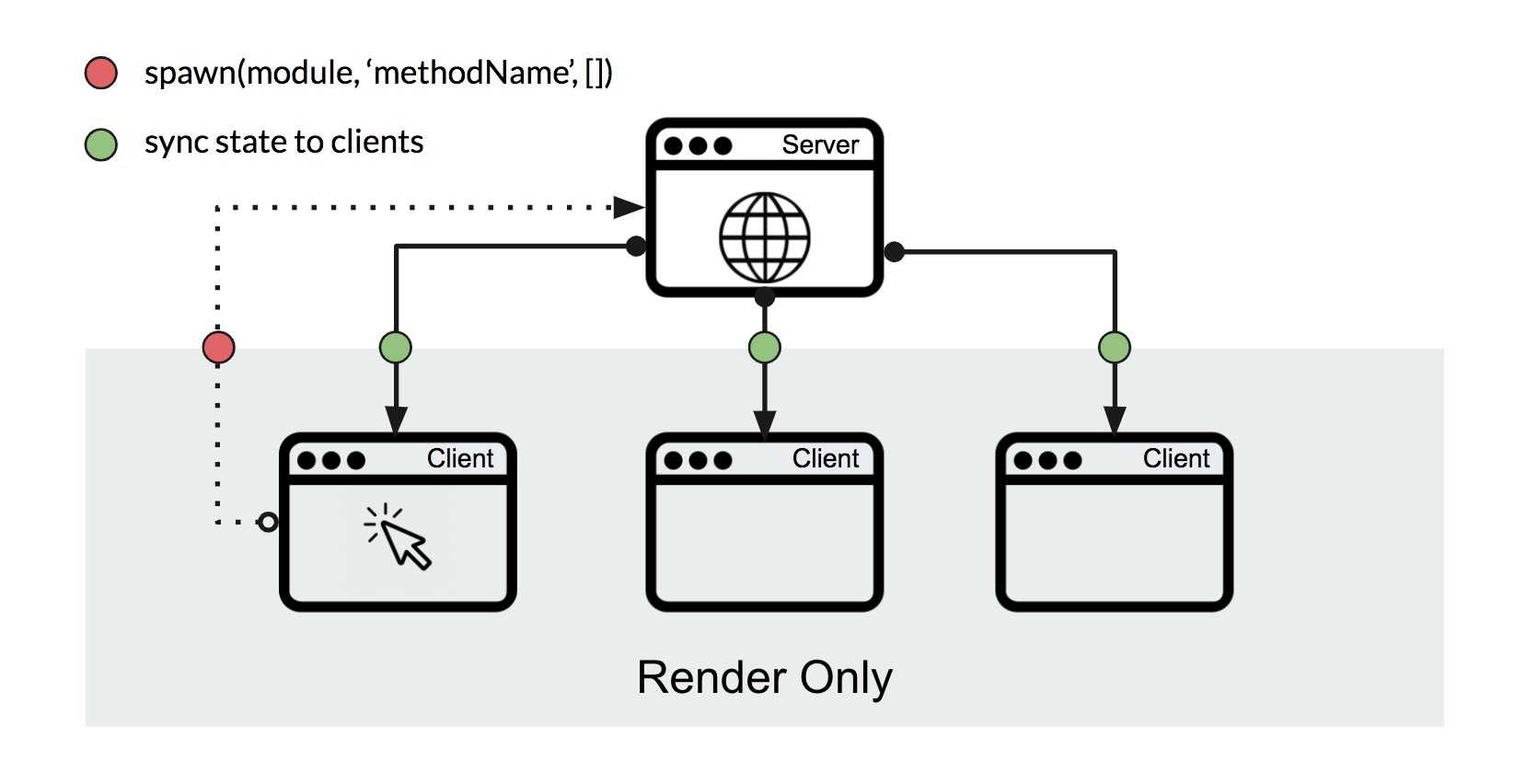
- The user triggers the client app proxy method through DOM events
- This proxy method is executed on the server app.
- The server app state is synchronized back to the client app.
Example
The overall workflow of reactant-share is shown in the figure below. Here is an example of a SharedWorker-based counter app.
- First, we define a counter app module and view module in
app.view.tsx
import React from "react";
import {
  ViewModule,
  createApp,
  injectable,
  useConnector,
  action,
  state,
  spawn,
} from "reactant-share";

@injectable({ name: "counter" })
class Counter {
  @state
  count = 0;

  @action
  increase() {
    this.count += 1;
  }
}

@injectable()
export class AppView extends ViewModule {
  constructor(public counter: Counter) {
    super();
  }

  component() {
    const count = useConnector(() => this.counter.count);
    return (
      <button type="button" onClick={() => spawn(this.counter, "increase", [])}>
        {count}
      </button>
    );
  }
}- Next, we use
createSharedApp()to create the client app. Its options must containworkerURL, the worker URL used to create a SharedWorker if it has not already been created.
import { render } from "reactant-web";
import { createSharedApp } from "reactant-share";
import { AppView } from "./app.view";

createSharedApp({
  modules: [],
  main: AppView,
  render,
  share: {
    name: "SharedWorkerApp",
    port: "client",
    type: "SharedWorker",
    workerURL: "worker.bundle.js",
  },
}).then((app) => {
  // render only
  app.bootstrap(document.getElementById("app"));
});- Finally, we just create the worker file
worker.tsxand build it asworker.bundle.jsfor theworkerURLoption.
import { createSharedApp } from "reactant-share";
import { AppView } from "./app.view";

createSharedApp({
  modules: [],
  main: AppView,
  render: () => {
    //
  },
  share: {
    name: "SharedWorkerApp",
    port: "server",
    type: "SharedWorker",
  },
}).then((app) => {
  // no rendering in the worker
});
The specific workflow of increase looks like this:
- The user clicks the button in client app.
spawn(this.counter, "increase", [])will be executed, which passes the parameters about the proxy execution to the server app.- The server app executes
this.counter.increase()and synchronizes the updated state back to each client app.
spawn() in reactant-share is inspired by the actor model.
reactant-share Framework
Multiple modes
- Shared tab - Suitable for browsers that do not support SharedWorker or ServiceWorker. The server app runs in a browser window with rendering. Across multiple browser windows, there is still only one server app. If it is closed or refreshed, another client app instance can be promoted to server app.
- SharedWorker - Recommended when browser compatibility allows it. reactant-share also supports graceful degradation: if the browser does not support SharedWorker, the app can fall back to Shared-Tab mode.
- ServiceWorker - Useful when Shared Web Apps are intended to be PWAs. It also supports automatic graceful degradation to Shared-Tab mode.
- Browser extension - Browser extensions provide a background thread where the reactant-share server app can run, while the UI runs in the client app.
- Detached window - reactant-share allows sub-applications to run as detached windows or be merged back into a larger application.
- iframe - reactant-share allows each child application to run in an iframe.
Example repo: SharedWorker/Detached window/iframe
User Experience
Since reactant-share instances share logic and state, when a user opens the same application in multiple browser windows, only the server app runs the full application.
The rendering-only client app will be so smooth that it will almost never freeze due to JS code, and the consistent application state will allow users to switch between multiple browser windows without any worries.
Development Experience
reactant-share provides a CLI, TypeScript support, and out-of-the-box runtime modes such as Shared-Tab, SharedWorker, ServiceWorker, and Browser Extension. It also includes a testbed for module testing, routing and persistence modules, and dynamic module support for lazy loading.
Service Discovery / Communications
Because reactant-share uses data-transport, it supports almost all transports supported by data-transport. Whichever app loads first, the client app waits for the server app to finish starting and then receives the initial application state from it.
Using an actor-model-inspired design, the client app can call spawn(counterModule, 'increase', []) to ask the server app to execute the module method and synchronize both the state and the result back to the client app.
If we need direct communication between the client app and the server app, we can use the PortDetector module.
class Counter {
  constructor(public portDetector: PortDetector) {
    this.portDetector.onServer(async (transport) => {
      const result = await transport.emit("test", 42);
      // result should be `hello, 42`
    });
    this.portDetector.onClient((transport) => {
      transport.listen("test", (num) => `hello, ${num}`);
    });
  }
}
Tracking/Debugging
Since reactant-share is based on Redux, it fully supports Redux DevTools, and the immutable time travel that Redux brings will make debugging easy.
Fault Tolerance / Data Consistency
In edge cases, synchronized actions can arrive out of order after a client app calls spawn() and the server app executes the proxied method. reactant-share integrates reactant-last-action, which provides sequence markers. If the client app detects an invalid sequence, it triggers a full state synchronization to correct the action order.
In addition, when the browser does not support the Worker API, reactant-share will perform a graceful degradation (e.g. SharedWorker mode -> Shared-Tab mode -> SPA mode).
Isolation
Regardless of modes such as Shared-Tab, SharedWorker or ServiceWorker, each application instance runs in isolation and their basic interactions can only be triggered by spawn() to synchronize state.
Configuration
reactant-share provides CLI, you just need to run npx reactant-cli init shared-worker-example -t shared-worker to get a project of reactant-share with SharedWorker mode. If you want to change its mode, you just need to change the configuration of createSharedApp().
createSharedApp({
  modules: [],
  main: AppView,
  render,
  share: {
    name: 'ReactantExampleApp',
    port: 'client',
-   type: 'SharedWorker',
+   type: 'ServiceWorker',
    workerURL: 'worker.bundle.js',
  },
}).then((app) => {
  app.bootstrap(document.getElementById('app'));
});
With that, we can quickly turn SharedWorker mode into ServiceWorker mode.
Transport/Performance
Because the client app only renders and receives synchronized state, it can stay responsive as long as each dispatched state update remains reasonably small. reactant uses Immer patches for updates. These patches are usually small, and reactant also performs development checks to help minimize patch size. In most scenarios, patches should not be large.
| Update state size | Volume of data | Deserialization |
|---|---|---|
| 30 Array * 1,000 items | 1.4 M | 14 ms |
| 30 Array * 1,0000 items | 14 M | 130 ms |
| 1000 Array * 1,000 items | 46 M | 380 ms |
Notebook: 1 GHz Intel Core M / 8 GB 1600 MHz DDR3
Benchmarking the reactant-share module with derived data cache:
| Number of modules and states | Total number of states | Each state update |
|---|---|---|
| 100 modules * 20 states | 2,000 | 3 ms |
| 200 modules * 30 states | 6,000 | 9 ms |
| 300 modules * 100 states | 30,000 | 44 ms |
Notebook: 1 GHz Intel Core M / 8 GB 1600 MHz DDR3
Therefore, reactant-share still performs well in large projects.
Complexity
Whether you practice clean architecture, DDD, OOP, or FP, reactant-share leaves enough flexibility for complex project architecture. It provides several optional features, but dependency injection is the one feature that should not be missed. reactant-share’s DI is inspired by Angular and has a similar model. Architectural complexity is ultimately determined by project conventions, but reactant-share tries to support complex architecture at the framework level.
Security
For reactant-share applications, communication between server and client serializes and deserializes only state and parameters. This reduces the framework-level attack surface, but it does not remove normal web security responsibilities. Projects should still use HTTPS, consider Subresource Integrity, and follow React’s XSS security guidance.
Testing
reactant-share provides testBed() to facilitate module testing. For example,
const { instance } = testBed({
  main: Counter,
  modules: [],
});
For integration testing of server app/client app interactions, reactant-share also provides mockPairTransports() to create mock transports.
const transports = mockPairTransports();

createSharedApp({
  modules: [],
  main: AppView,
  render,
  share: {
    name: "SharedWorkerApp",
    port: "client",
    type: "SharedWorker",
    transports: {
      client: transports[0],
    },
  },
}).then((app) => {
  const clientApp = app;
  // render only
  app.bootstrap(document.getElementById("app"));
});

createSharedApp({
  modules: [],
  main: AppView,
  render: () => {
    //
  },
  share: {
    name: "SharedWorkerApp",
    port: "server",
    type: "SharedWorker",
    transports: {
      client: transports[1],
    },
  },
}).then((app) => {
  const serverApp = app;
  // no rendering in the worker
});
After mocking transport like this, clientApp and serverApp can be tested together.
APIs
@injectable()
You can use @injectable() to decorate a module that can be injected. With TypeScript’s emitDecoratorMetadata, or with @inject(), dependencies can be injected automatically.
@state
@state is used to decorate a class property that will create a reducer for Redux.
@action
It updates Redux state with mutable syntax inside a class method.
class Todo {
  @state
  list: { text: string }[] = [];

  @action
  addTodo(text: string) {
    this.list.push({ text });
  }
}ViewModule/useConnector()
ViewModule is a view module with a component, which is completely different from a React class component. The component of ViewModule is a function component used for the state connection between the module and the UI (using useConnector()) and for application view bootstrap.
spawn()
spawn() transfers class method execution from the client app to the server app and synchronizes state to all client apps. It is inspired by the Actor model, but unlike some actor systems, reactant-share’s spawn() does not create new threads.
createSharedApp()
reactant-share supports multiple modes, and you can use createSharedApp() to create different Shared Web Apps that interact with each other through transport APIs.
Q&A
- Can reactant-share completely solve the complexity of the architecture?
Although reactant-share reduces some complexity at the framework level, large-application complexity does not depend entirely on the framework. Using reactant-share does not guarantee that a large project will be clean, efficient, and maintainable. It also depends on testing strategy, coding standards, CI/CD, development process, module design, and many other factors.
But in terms of module model and shared model, reactant-share already provides as clean a design as possible. If you are interested in reactant-share, you can try it quickly.
- Does reactant-share have no cons at all? Are there any limitations to using it?
reactant-share is a framework for building Shared Web Apps, but this model is not free. It can face performance issues from data transfer. The maintenance cost of SharedArrayBuffer also forced us to avoid it for now. This reflects a core limitation of JavaScript “multithreading”: memory is not shared efficiently by default.
Although Shared Web Apps let the client app run in a render-only client thread, they introduce additional overhead from state transfer. We must keep that transfer lightweight and efficient. reactant-share uses Immer-based state patches, but it is still difficult to guarantee that every patch is minimal.
reactant-share provides a development option, enablePatchesChecker. In development mode, it is enabled by default. Any invalid mutation operation will trigger an alert. After such alerts are fixed, reactant-share can usually keep update size as small as possible.
Conclusion
Front-end frameworks and architectures are always evolving. With stronger Worker support in modern browsers and more multi-core CPU devices, we have reached a more mature stage for exploring multi-threaded web applications. Future web applications can make better use of device resources, provide smoother user experiences, and reduce the burden of manual multi-threaded programming for developers.
This is what reactant-share wants to try and work on.
If you think reactant-share is interesting, feel free to give it a star.
Repo: reactant