Building an AI-based browser phone extension
2023-05-01
Motivation
On March 14, 2023, OpenAI released GPT-4, a transformer-based model that was more reliable, intelligent, and capable of handling nuanced instructions than GPT-3.5. GPT-4 performed strongly across many benchmarks, which accelerated the growth of AI-powered applications. Among these application areas, the phone remains a fundamental human communication tool and a core communication service for businesses. The potential for AI to improve communication efficiency and quality in phone interactions is worth exploring.
Compared with traditional phone applications, we aim to build an AI-driven browser phone extension. This extension uses AI to assist at every stage of the call workflow and improve the user’s calling experience.
- Before a call, we want it to extract contact information from third-party webpages, especially complex ones. It should also analyze relevant contact data such as call recordings, voicemails, and SMS messages associated with each identified contact. This helps users understand past interactions, sentiment signals, and possible call summaries before calling.
- During a call, the spoken dialogue will be transcribed into text in real-time. Based on this live text conversation, the extension should offer effective intelligent prompts and assistance. It could even intelligently deploy an AI voicebot to participate in the conversation.
- After a call concludes, it will intelligently generate a call sentiment assessment, conversation summary, and to-do list based on the current call information, the conversation transcript, and potentially past interactions with the contact. It will also provide automatic form filling in any CRM page forms.
Once this browser phone extension delivers these capabilities, phone workflows can be integrated more naturally with related business platforms. This demonstrates a practical use of AI across the entire call workflow.
Integrated AI Services and Capabilities
Before implementing this extension, we should clearly define the AI services and capabilities we plan to integrate in this PoC:
- OpenAI SDK: Provides the chat/completions API for intelligent content generation.
- OpenAI SDK: Provides the audio/transcriptions API for transcribing audio files to text.
- Azure: Additionally offers real-time STT (Speech-to-Text) and TTS (Text-to-Speech) APIs.
Flowchart
Based on the above three sets of APIs, combined with Browser Extension APIs, let’s design the overall business process:
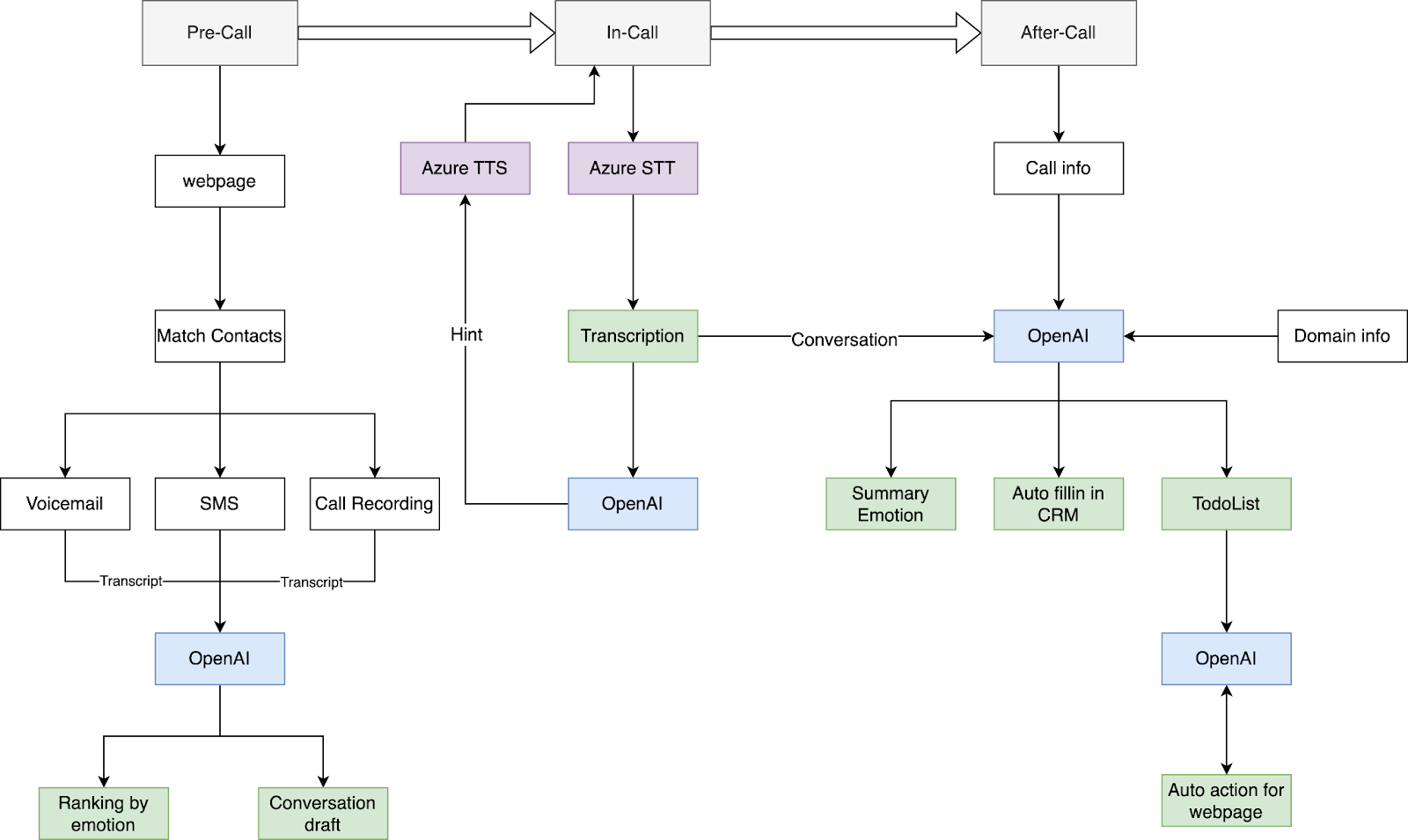
Implementation
Creating a basic browser phone extension project
We can base our project on the open-source browser-extension-boilerplate, which supports building browser extensions for multiple browsers:
- Chrome
- Firefox
- Opera (Chrome Build)
- Edge (Chrome Build)
- Brave
- Safari
We will use content.js as the JavaScript file injected into tabs by default. We will use background.js as the browser extension service worker, which opens a separate page (client.js) that functions as the phone app.
Taking the manifest.json configuration of a Chrome MV3 extension as an example:
{
  "manifest_version": 3,
  "name": "demo",
  "version": "0.0.1",
  "description": "A browser extension demo",
  "background": {
    "service_worker": "background.js"
  },
  "action": {},
  "icons": {
    "128": "logo.png"
  },
  "permissions": ["tabs", "activeTab", "debugger", "management"],
  "host_permissions": ["http://*/", "https://*/"],
  "content_scripts": [
    {
      "matches": ["http://*/*", "https://*/*", "<all_urls>"],
      "js": ["content.js"],
      "css": ["content.styles.css"]
    }
  ],
  "web_accessible_resources": [
    {
      "resources": ["content.styles.css", "logo.png"],
      "matches": []
    },
    {
      "resources": ["client.html", "redirect.html", "logo.png"],
      "matches": ["<all_urls>"]
    }
  ]
}
We should primarily focus on the permissions section:
tabsandactiveTabare mainly used for tab communication and state capture.debuggeris used for automating webpage operations. This permission is sensitive and should be requested only when the automation feature is enabled and clearly explained to users.
Implementing Contact Information Extraction from Any Webpage
In content.js, we will implement basic content extraction from webpages:
chrome.runtime.onMessage.addListener((message, sender, sendResponse) => {
  const type = message.type;
  if (type === "get-webpage-text") {
    sendResponse(document.body.innerText);
  }
});
And in client.js, we will implement the corresponding request for webpage content:
async function getActiveTab() {
  const { id } = await chrome.tabs.getCurrent();
  const [activeTab] = (await chrome.tabs.query({ active: true })).filter(
    (item) => item.id !== id
  );
  return activeTab;
}

async function getPageText() {
  const activeTab = await getActiveTab();
  if (!activeTab) {
    throw new Error("No active tab found");
  }
  const response = await chrome.tabs.sendMessage(activeTab.id!, {
    type: "get-webpage-text",
  });
  return response;
}
This example only uses the simple document.body.innerText API. A production extractor should consider content visibility, iframe content, shadow DOM, dynamic loading, and other factors. Due to space limitations, we will not elaborate further here.
Next, we will submit the extracted content to the OpenAI API to extract contact information:
async function fetchContactsInfo() {
  const text = await getPageText();
  const content = `The following is webpage text extracted with document.body.innerText. Extract contact information from it.

      Webpage text:
      ${text}

      The result must be a JSON array with the following shape:

      {
        name: string;
        title: string;
        phone: string;
        email: string[];
      }[]

      IMPORTANT: only respond with the JSON array.
      `;
  const result = await fetchGPT({
    content,
  });
  return result;
}
Here we use a TypeScript-like shape in the prompt to guide the model toward a stable JSON structure.
fetchGPT can be implemented independently. In production, avoid putting API keys directly in the browser extension. Use a backend proxy, token exchange, or another controlled authorization mechanism.
Intelligent Contact Analysis and Sorting
Once we have obtained contact information, we can match it with contacts in the current phone system and also match the corresponding call recordings, voicemails, and SMS messages. SMS messages are typically text-based, so we can organize this information and submit it directly to OpenAI. However, call recordings and voicemails are audio files, so we will need to use the OpenAI audio/transcriptions API.
async function transcriptVoicemail(files) {
  const results = await Promise.allSettled(
    files.map(async (file) => {
      const body = {
        file: file.file,
        model: "whisper-1",
        temperature: 0,
        response_format: "json",
      };
      const formData = new FormData();
      for (const [name, value] of Object.entries(body)) {
        formData.append(name, value as never);
      }
      const data = await firstValueFrom(
        defer(async () => {
          const response = await fetch(`${baseUrl}/v1/audio/transcriptions`, {
            method: "POST",
            headers: {
              "Access-Control-Allow-Origin": "*",
              Authorization: "Bearer your-api-key",
            },
            body: formData,
          });

          if (!response.ok) {
            throw new Error("fetch API failed");
          }

          const data: {
            text: string;
          } = await response.json();

          return data;
        }).pipe(retry(3))
      );

      return { text: data.text, url: file.url };
    })
  );

  const voiceMailTranscriptions = results.reduce((acc, result, i) => {
    if (result.status === "fulfilled") {
      const id = files[i].id!;
      const value = result.value;
      acc[id] = {
        ...files[i],
        transcription: value.text,
        playURL: value.url,
      };
    }
    return acc;
  }, {});

  return voiceMailTranscriptions;
}
This way, we can obtain transcriptions of voicemails. Similarly, we can also get transcriptions of call recordings.
Next, we submit this information to OpenAI to analyze sentiment:
async function getEmotion(callRecordings, voiceMails, sms) {
  const content = `
  Analyze the user's sentiment based on the call recordings, voicemails, and SMS messages below.
  Return an emotion score from 0 to 100, where 0 means angry and 100 means peaceful.

  Call recordings:
  ${callRecordings}

  Voicemails:
  ${voiceMails}

  SMS:
  ${sms}

  The response must be JSON with the following shape:
  {
    score: number;
    description: string;
  }

  IMPORTANT: only return the JSON result.
  `;
  const result = await fetchGPT({
    content,
  });
  return result;
}
Once we obtain sentiment analysis for each contact, we can sort the results to help users understand the likely communication context for each customer. This can help users plan call strategy and scheduling.
Real-time STT
Azure provides real-time STT and TTS services. We will use the official SDK, microsoft-cognitiveservices-speech-sdk, to implement STT:
import * as sdk from "microsoft-cognitiveservices-speech-sdk";

function startSpeechRecognition() {
  const speechConfig = sdk.SpeechConfig.fromSubscription(
    subscriptionKey,
    region
  );
  speechConfig.speechRecognitionLanguage = language;

  const stream = getMediaStream();
  if (!stream) return null;

  const audioConfig = sdk.AudioConfig.fromStreamInput(stream);
  const newRecognizer = new sdk.SpeechRecognizer(speechConfig, audioConfig);

  newRecognizer.recognizing = (s, e) => {
    console.log(`Recognizing: ${e.result.text}`);
  };

  newRecognizer.recognized = (s, e) => {
    console.log(`Recognized: ${e.result.text}`);
    if (e.result.text !== undefined) {
      setTranscript(e.result.text);
    }
  };

  newRecognizer.canceled = (s, e) => {
    if (e.errorCode === sdk.CancellationErrorCode.ErrorAPIKey) {
      console.error("Invalid or incorrect subscription key");
    } else {
      console.log(`Canceled: ${e.errorDetails}`);
    }
    setIsListening(false);
  };

  newRecognizer.sessionStopped = (s, e) => {
    console.log("Session stopped");
    newRecognizer.stopContinuousRecognitionAsync();
    setIsListening(false);
  };

  newRecognizer.startContinuousRecognitionAsync(
    () => {
      console.log("Listening...");
    },
    (error) => {
      console.log(`Error: ${error}`);
      newRecognizer.stopContinuousRecognitionAsync();
      setIsListening(false);
    }
  );

  setRecognizer(newRecognizer);
}
In this way, using sdk.AudioConfig.fromStreamInput(stream) with our WebRTC stream allows us to achieve real-time STT. Furthermore, by calling this method separately for both the input and output streams of WebRTC, we can obtain real-time text content for both sides of the conversation.
It’s worth noting that microsoft-cognitiveservices-speech-sdk provides a remarkably comprehensive set of input and output stream configurations to accommodate a wide range of STT scenarios.
Intelligent Hints During Calls
In the Azure SDK, the recognized event represents an intermediate paused result in the ongoing speech recognition process. When this event is triggered, we can submit the in-progress conversation text to OpenAI for potential hints:
async function getHint(conversation) {
  const content = `
  You are an intelligent conversation assistant. Provide possible hints based on the following conversation:

  ${conversation}

  The response must be JSON with the following shape:
  {
    hint: string;
  }

  IMPORTANT: only return the JSON result.
  `;
  const result = await fetchGPT({
    content,
  });
  return result;
}
The hints we obtain will also be displayed in the conversation UI, shown to the user in real-time to provide this intelligent assistance. For example, if the conversation involves discussing discount calculations, the AI will provide the calculated results.
Generating Emotion, Summary, and To-Do List After the Call
We will generate reports such as emotion analysis and summaries by using the complete conversation text as part of the prompt for OpenAI:
async function getReport(conversation) {
  const content = `
  Summarize the following conversation, suggest improvements, and evaluate the quality of customer service.

  ${conversation}

  The result must be JSON. Make the summary and improvements detailed, using the following shape:

  interface Report {
    summary: string;
    improvements: string[];
    evaluation: Evaluation;
  }

  interface Evaluation {
    sellResult: 'Deal' | 'Lost deal' | 'Follow up';
    customerEmotion: 'Happy' | 'Sad' | 'Unhappy';
  }

  IMPORTANT: only return the JSON result.
  `;
  const result = await fetchGPT({
    content,
  });
  return result;
}
In a similar manner, we will also generate a to-do list for the current conversation:
async function getTodoList(conversation) {
  const content = `
  I am a sales agent. Generate a to-do list for a customer relationship management platform based on the following conversation.

  ${conversation}

  The result must be a JSON array. Set checked and processing to false.

  type ToDoListItem = {
    id: string;
    checked: boolean;
    message: string;
    processing: boolean;
  }[];

  IMPORTANT: only return the JSON array, and use only the conversation above.
  `;
  const result = await fetchGPT({
    content,
  });
  return result;
}
Intelligently Filling Out Forms
As a fundamental business communication service, phone systems are commonly integrated with third-party CRM platforms. Intelligent CRM form filling can improve collaboration for B2B users.
To implement intelligent form filling, the first step is to address how to extract and compress DOM information from form pages of any third-party CRM. Here, we reference TaxyAI’s DOM compression model:
By traversing all nodes in the DOM and analyzing their validity, we retain useful attribute information and assign a DI (“DOM Identifier”) tag to each valid node.
const allowedAttributes = [
  "aria-label",
  "data-name",
  "name",
  "type",
  "placeholder",
  "value",
  "role",
  "title",
];

const sample = `
<div>
  <button
    aria-label="Add to wishlist: Brinnon, Washington"
    type="button"
    id="1396"
  ></button>
  <div aria-label="Photo 1 of 6"></div>
</div>
`;
Once we have compressed DOM information, we can infer webpage labels by analyzing visibility, effective width and height, operability, and related attributes. Then we submit this information to OpenAI:
async function getFieldValues(
  labels,
  domainInfo,
  callInfo,
  conversation,
  summary
) {
  const content = `
  You are a browser DOM automation assistant. Your goal is to help me fill in the customer relationship management Task form based on the conversation I provided.

  In the summary field, input the summary of the conversation, and the call transcription.

  This is an example field:
  { key: 'Title' }

  This is an example response:
  { key: 'Title', value: 'Here is the value for title' }

  The result must always be JSON with the following shape:
  {
    key: string;
    value: string;
  }[]

  the list of input fields:
  ${JSON.stringify(labels, null, 2)}

  Domain information:
  ${domainInfo}

  Call information:
  ${callInfo}

  Conversation:
  ${conversation}

  Summary:
  ${summary}
  `;
  const result = await fetchGPT({
    content,
  });
  return result;
}
Once we have fieldValues, we submit the current page DOM and fieldValues to OpenAI so it can map values to the corresponding input fields:
async function getInputValues(fieldValues, dom) {
  const content = `
  You are a browser automation assistant.

  You will receive webpage DOM data and a list of input data. Tell me how to fill in the fields based on that information.

  This is an example DOM:
  <div id="1101">Title<input id="1102"><div>

  This is example input data:
  { key: 'Title', value: 'Here is the value for title' }

  This is an example response:
  { id: '1102', value: 'Here is the value for title' }

  Here is the list of input data:
  ${fieldValues}

  Here is the webpage DOM:
  ${dom}

  The response must be JSON with the following shape:
  {
    id: string;
    value: string;
  }[]

  IMPORTANT: only return the JSON result.
  `;
  const result = await fetchGPT({
    content,
  });
  return result;
}
Then we send these values to the current CRM form page to complete automatic form filling. In production, this step should include user confirmation, validation, and rollback support before writing data into third-party systems.
In client.js, we send inputValues:
async function sendInputValues() {
  await chrome.tabs.sendMessage(activeTab.id!, {
    type: 'auto-run-action',
    action: inputValues.filter((item) => item.value),
  });
}
In content.js, complete the final input filling:
chrome.runtime.onMessage.addListener((message, sender, sendResponse) => {
  const { type, action } = message;
  if (type === "auto-run-action") {
    action.forEach(({ id, value }) => {
      const inputElement = getElementById(id);
      if (!inputElement) {
        console.error("Could not find element with id", id);
        return;
      }
      inputElement.value = value;
      inputElement.dispatchEvent(new Event("change", { bubbles: true }));
    });
    sendResponse();
  }
});
We omit the details of handling more complex form types.
Browser Automated To-Do Execution
We use the TaxyAI-style automated DOM operation model mentioned earlier, which uses OpenAI to control the browser and perform repetitive actions on behalf of the user.
By appending Thought and Action context prompts, OpenAI can iteratively infer the next DOM operation until the current to-do item is completed.
This is the crucial function for formatting the prompt:
function formatPrompt(taskInstructions, previousActions, pageContents) {
  let previousActionsString = "";

  if (previousActions.length > 0) {
    const serializedActions = previousActions
      .map(
        (action) =>
          `<Thought>${action.thought}</Thought>\n<Action>${action.action}</Action>`
      )
      .join("\n\n");
    previousActionsString = `You have already taken the following actions: \n${serializedActions}\n\n`;
  }

  return `The user requests the following task:

${taskInstructions}

${previousActionsString}

Current time: ${new Date().toLocaleString()}

Current page contents:
${pageContents}`;
}
Conclusion
At this point, we have implemented a proof-of-concept AI-based browser phone extension that covers the full phone call workflow.
This article is a Proof of Concept (PoC) and outlines the general implementation path. A production application still needs substantial work in cost control, privacy, security, reliability, and performance. For example, cost can be controlled through token estimation and segmented requests. Privacy risks can be reduced through local Web LLM-based redaction, backend policy enforcement, consent handling for call recording, and explicit user confirmation before CRM writes or browser automation.